6.W.6: Publish Digital Content & Keyboarding Skills Practice 6th Grade CCSS
$12.00
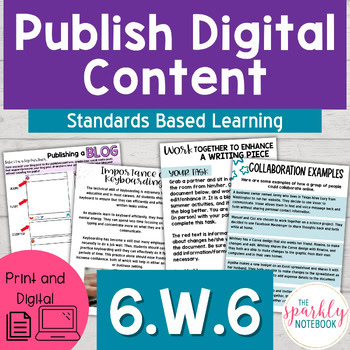
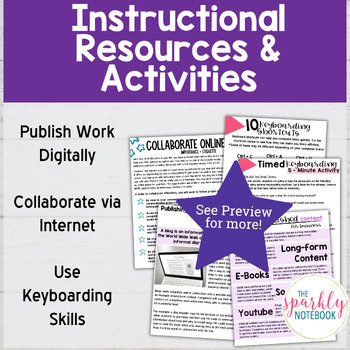
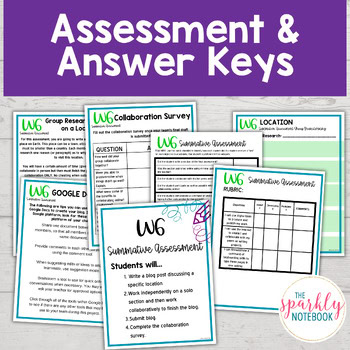
With this standards-based resource based on 6.W.6, students will have the opportunity to publish content online and collaborate with their peers while showing their keyboarding skills. This resource includes everything you need to check for understanding, including a summative assessment with a rubric. All answer keys are also included.
With this standards-based resource based on 6.W.6, students will have the opportunity to publish content online and collaborate with their peers while showing their keyboarding skills. This resource includes everything you need to check for understanding, including a summative assessment with a rubric. All answer keys are also included.
This resource includes both a printable and digital version that is ready for Google Classroom and other distance learning platforms.
You can use this resource:
To give extra practice with CCSS W.6.6
For classwork and center rotations
For assessments and test prep
How will this resource help me?
Easily assess where students are in their understanding of this standard
Encourage students to self-assess their own growth
Ensure standard mastery by assessing each objective within the standard
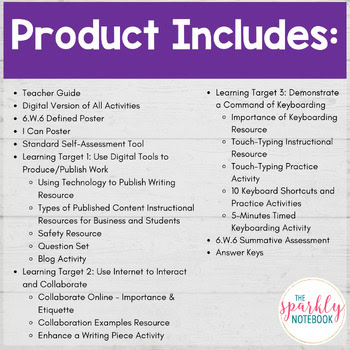
This Resource Includes:
Teacher Guide
Digital Version of All Activities
W.6 Defined Poster
I Can Poster
Standard Self-Assessment Tool
Learning Target 1: Use Digital Tools to Produce/Publish Work
Using Technology to Publish Writing Resource
Types of Published Content Instructional Resources for Business and Students
Safety Resource
Question Set
Blog Activity
Learning Target 2: Use Internet to Interact and Collaborate
Collaborate Online – Importance & Etiquette
Collaboration Examples Resource
Enhance a Writing Piece Activity
Learning Target 3: Demonstrate a Command of Keyboarding
Importance of Keyboarding Resource
Touch-Typing Instructional Resource
Touch-Typing Practice Activity
10 Keyboard Shortcuts and Practice Activities
5-Minutes Timed Keyboarding Activity
W.6.6 Summative Assessment
Answer Keys
General Templates
This product is created for 6th grade, but the activities could be transferable to 7th and 8th grade since many of the standards are parallel.
The following standards are addressed with this resource.
CCSSW.6.6
Use technology, including the Internet, to produce and publish writing as well as to interact and collaborate with others; demonstrate sufficient command of keyboarding skills to type a minimum of three pages in a single sitting.
FAQs
Are answer keys included?
Yes. The answer keys are included as the last pages of the resource download.
Do all the activity worksheets need to be completed all at once, or can I split it up?
You could certainly split this up into multiple days/activities. Especially with the long resources. Some activities are easy to split into three “activities”. First, cold read (could be a partner read) w/vocab and multiple choice questions. Second, re-read and summary page. Third, choose one writing activity. You could even do stations. Maybe partner read first, then one station does the vocabulary and summary page. Another station could do the multiple choice, and you could do a teacher-led station with one writing prompt. Then, you can have a fourth station independently write the other prompt. Of course, you know your students better than I do! These are just some ideas!! I try to section out the activities, so you have the freedom to make it work for you!
Is a digital version included?
Yes, all resources within this product line includes a digital version that uses Google Apps.
What is the Lexile level of your reading passages?
Since Lexile is trademarked, I am unable to label them as Lexile levels. However, I have used the free Lexile analyzer and I stay within the recommended grade level range. If there is a specific reading packet that you need details for, please contact me directly and I’ll give you a more specific range.
I just purchased a resource, but I didn’t get it (or can’t find it).
Double-check the SPAM folder in your email inbox. If you find it there, be sure to mark it “NOT SPAM” to keep others from going there. If it is not in your email (inbox or spam folder) after 15 minutes, please reach out with your purchase number.
If you got the email and clicked on the link but can’t find the file, check your downloads folder. The link provided is a FORCE DOWNLOAD link, so it will automatically download to your computer once clicked. Typically this will go to your downloads folder or your desktop, unless otherwise set.
How do I get the downloaded resource from my computer to my Google Drive?
We use cookies on our website to give you the most relevant experience by remembering your preferences and repeat visits. By clicking “Accept All”, you consent to the use of ALL the cookies. However, you may visit "Cookie Settings" to provide a controlled consent.View Terms and Conditions
This website uses cookies to improve your experience while you navigate through the website. Out of these, the cookies that are categorized as necessary are stored on your browser as they are essential for the working of basic functionalities of the website. We also use third-party cookies that help us analyze and understand how you use this website. These cookies will be stored in your browser only with your consent. You also have the option to opt-out of these cookies. But opting out of some of these cookies may affect your browsing experience.
Necessary cookies are absolutely essential for the website to function properly. These cookies ensure basic functionalities and security features of the website, anonymously.
Cookie
Duration
Description
cookielawinfo-checkbox-analytics
11 months
This cookie is set by GDPR Cookie Consent plugin. The cookie is used to store the user consent for the cookies in the category "Analytics".
cookielawinfo-checkbox-functional
11 months
The cookie is set by GDPR cookie consent to record the user consent for the cookies in the category "Functional".
cookielawinfo-checkbox-necessary
11 months
This cookie is set by GDPR Cookie Consent plugin. The cookies is used to store the user consent for the cookies in the category "Necessary".
cookielawinfo-checkbox-others
11 months
This cookie is set by GDPR Cookie Consent plugin. The cookie is used to store the user consent for the cookies in the category "Other.
cookielawinfo-checkbox-performance
11 months
This cookie is set by GDPR Cookie Consent plugin. The cookie is used to store the user consent for the cookies in the category "Performance".
viewed_cookie_policy
11 months
The cookie is set by the GDPR Cookie Consent plugin and is used to store whether or not user has consented to the use of cookies. It does not store any personal data.
Functional cookies help to perform certain functionalities like sharing the content of the website on social media platforms, collect feedbacks, and other third-party features.
Performance cookies are used to understand and analyze the key performance indexes of the website which helps in delivering a better user experience for the visitors.
Analytical cookies are used to understand how visitors interact with the website. These cookies help provide information on metrics the number of visitors, bounce rate, traffic source, etc.
Advertisement cookies are used to provide visitors with relevant ads and marketing campaigns. These cookies track visitors across websites and collect information to provide customized ads.


 Reload document
  Open in new tab